
The problem.
Down The Road sells cycling kit: jerseys, bib shorts, vests and socks. Riders buy them as a set, but each piece had its own product page. To build a kit, a rider had to visit four pages, choose four sizes and add to the cart four times, and every extra step is a chance to give up. We built one page where the shopper chooses every piece, sees the price of the whole set and adds it to the cart with one button.
What's on the page
As captured on 22 Oct 2026.
- Four product groups on one page: jerseys, bibs, vests and windbreakers, socks
- 19 jersey designs, 9 bibs, 8 vests and windbreakers, 6 socks
- The photo changes as soon as a colour is picked
- Sizes for each piece; sold-out sizes stay visible and are crossed out
- "Product details" and "Size & fit" links next to each piece
- One set price ("From €276.80" until every piece is chosen) and one "Add kit to cart" button
- Built into the store's own Shopify theme, with a bundles app behind it, so stock and orders work like any other order
We have no before-and-after sales figures we can publish, so this page shows how the build works and makes no claims about what it earned.
What it looks like.
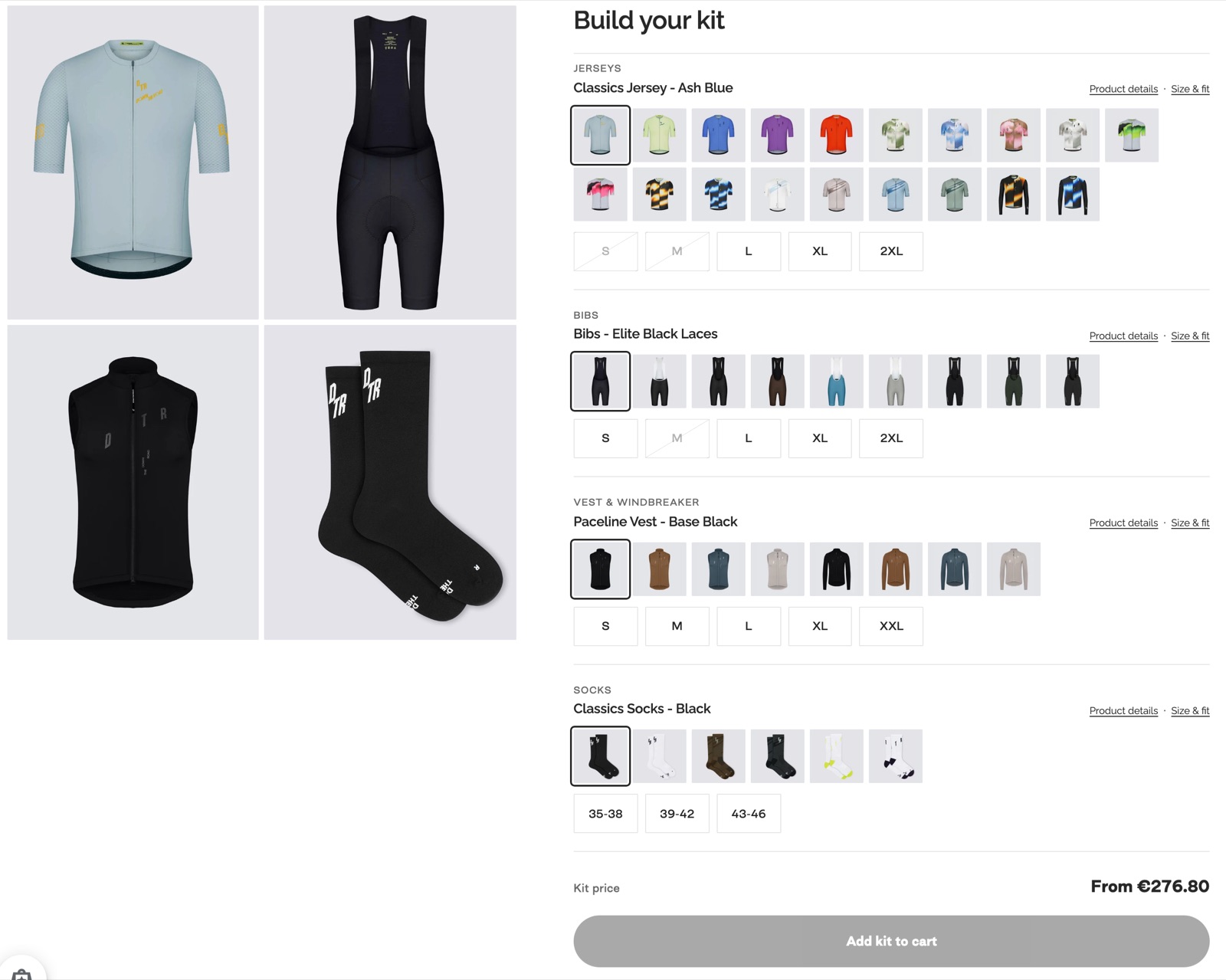
What is on the page, section by section.
A row for each piece
Jerseys, bibs, vests and socks sit on one page, each with its own row of colours.
The shopper finishes the set without leaving the page.
The photo follows the click
Picking a colour swaps the photo of that piece right away.
Shoppers can see whether the pieces look right together before they buy them as a set.
Sizes for each piece
Each piece has its own sizes, and a sold-out size is crossed out where the shopper can see it.
Shoppers know what's available before checkout and can pick another colour if their size is gone.
One price, one button
The set price updates as pieces are chosen, and one button adds them all.
The shopper makes one decision where there used to be four, with fewer steps between wanting the kit and paying for it.
Nothing new to run
It lives in the store's theme and uses the store's products, stock and checkout.
The team keeps working the way it did, and orders arrive like any other order.
Try the idea on a different shop
The real builder sells cycling kit, and the same idea works for any products people buy together. Below is a working example with made-up products, so you can try the flow yourself.
Dripper
from $28Colour
Kettle
from $64Colour
Grinder
from $45Type
Beans
from $16Roast
Size
Set price
Services used.
Pages on this site that describe the work behind this case.
How we would adapt this to your business.
- Any store where products go together: skincare routines, coffee kits, gift boxes, furniture sets, pet starter packs.
- We agree the rules with you first: which groups, which products, and whether the set has its own price or a saving.
- After launch we watch how shoppers use it and adjust the layout, as we would with any page we test.
Want something like this for your business?
Tell us what you sell and who you want to reach. We reply with a plan and a price.